
Purpose of the tutorial
The purpose of this query is to retrieve an employee’s resignation/termination details from Oracle Fusion HCM, including the resignation date and relieving date, while considering both committed employee data and pending transaction data stored in the HCM transaction XML.
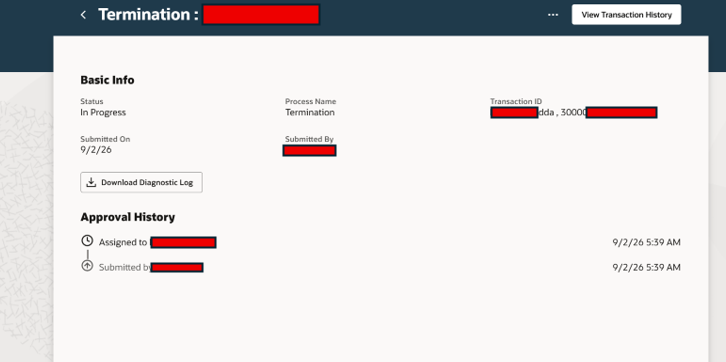
Note: -If the transaction is in a Pending state, the date is not yet stored directly in the PER_PERIODS_OF_SERVICE table. Instead, the pending transaction data is temporarily stored in the transaction XML. Therefore, we need to retrieve the date from the transaction tables/XML until the transaction is approved and the data is committed to PER_PERIODS_OF_SERVICE.
Sql query(Basic query reference)
SELECT papf.PERSON_NUMBER
,ppnf.DISPLAY_NAME
,paam.person_id
,hth.transaction_id
,NVL(
extractValue( value(RowType),’//PeriodOfServiceEORow/NotifiedTerminationDate/DATA’ ),
TO_CHAR(
ppos.notified_termination_date,
‘DD/MM/YYYY’,
‘NLS_DATE_LANGUAGE=AMERICAN’
)
) AS Reliving_Date
,NVL(
extractValue( value(RowType),’//PeriodOfServiceEORow/ActualTerminationDate/DATA’ ),
TO_CHAR(
ppos.notified_termination_date,
‘DD/MM/YYYY’,
‘NLS_DATE_LANGUAGE=AMERICAN’
)
) AS Resignation_Date
FROM per_all_people_f papf
,per_person_names_f ppnf
,per_all_assignments_m paam
,per_periods_of_service PPOS
,hrc_txn_header hth
,hrc_txn_data htd
,TABLE (per_bipntf_utility.extractXMLSequence(hth.transaction_id, ‘TRANSACTION’)) RowType
WHERE 1 = 1
and trunc(sysdate) between paam.effective_start_date and paam.effective_end_date
and paam.assignment_type = ‘E’
and paam.effective_latest_change = ‘Y’
and paam.assignment_status_type = ‘ACTIVE’
and paam.primary_flag = ‘Y’
and trunc(sysdate) between papf.effective_start_date and papf.effective_end_date
and paam.person_id = papf.person_id
and trunc(sysdate) between ppnf.effective_start_date and ppnf.effective_end_date
and ppnf.name_type = ‘GLOBAL’
and paam.person_id = ppnf.person_id
and ppos.period_of_service_id=paam.period_of_service_id
and hth.transaction_id = htd.transaction_id
and hth.object_id = paam.assignment_id
and hth.object = ‘PER_ALL_ASSIGNMENTS_M’
and hth.module_identifier IN (
‘Resignation’
,’Terminations’
)
and htd.STATUS IN (
‘PENDING’
,’APPROVED’
,’REJECTED’
,’WITHDRAWN’
,’COMPLETE’
)
and htd.STATE IN (
‘SUBMITTED’
,’COMPLETE’
,’CANCELLED’
)
and extractValue(value(RowType), ‘//sensorDataReferenceCode’) IN (
‘Resignation’
,’WithdrawResignation’
,’Terminations’
,’ReverseTermination’
)
and hth.creation_date = (
SELECT max(a.creation_date)
FROM hrc_txn_header a
WHERE 1 = 1
and a.transaction_id = hth.transaction_id
and a.object_id = hth.object_id
)
and papf.PERSON_NUMBER=’XXX’
If you don’t want to use RowType or TABLE(per_bipntf_utility.extractXMLSequence(hth.transaction_id, ‘TRANSACTION’)) RowType, you can simply extract the data directly from the XML like
Here, XML_DATA_CACHE represents the attribute name, while //PeriodOfServiceEORow/ActualTerminationDate/DATA defines the corresponding path.
SELECT EXTRACTVALUE( hth.XML_DATA_CACHE,
‘//PeriodOfServiceEORow/ActualTerminationDate/DATA’
) AS termination_date
FROM hrc_txn_header hth
WHERE hth.transaction_id = ‘XXX’
Important Note: If the transaction has been archived, the corresponding data should be retrieved from the archive tables, such as HRC_TXN_HEADER_ARCHIVE and HRC_TXN_DATA_ARCHIVE, instead of the active transaction tables.
Reference
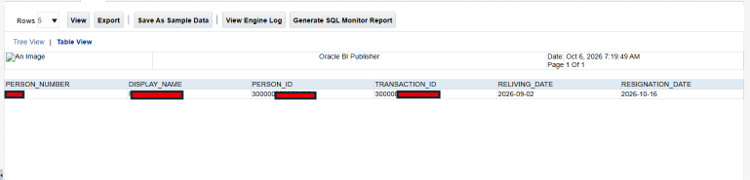
Output
What does extractValue( value(RowType) do?
extractValue() takes an XML value and an XPath, then returns the text/value at that location.RowType isn’t necessarily the XML document itself. It is the row/object returned by the table function.
What does //PeriodOfServiceEORow/ActualTerminationDate/DATA do?
–You don’t need to specify all the parent elements before it, such as: <TRANSACTION>,BUSINESSDATA>…. The // skips all those levels.
–Find the XML element named PeriodOfServiceEORow.Inside PeriodOfServiceEORow, find ActualTerminationDate
–So now we’ve reached: <ActualTerminationDate> …</ActualTerminationDate>
–Inside ActualTerminationDate, find the DATA element.
What does TABLE (per_bipntf_utility.extractXMLSequence(hth.transaction_id, ‘TRANSACTION’)) RowType do?
“Take the XML transaction identified by hth.transaction_id, extract its TRANSACTION XML sequence, turn that sequence into rows, and call the resulting table RowType.”
TABLE( per_bipntf_utility.extractXMLSequence(…)) – Convert the collection returned by the function into something that SQL can use like a table.
“For each HCM transaction, take its transaction XML, expose that XML as a SQL row called RowType, so that I can subsequently use VALUE(RowType) and XPath expressions to retrieve individual values from the XML.”
What does hth.object = ‘PER_ALL_ASSIGNMENTS_M’ do?
This means you are restricting the query to transactions where the transaction is being performed against the employee assignment object or something else
What does hth.module_identifier:- do?
consider transactions that belong in which process
If you don’t want to use RowType or
Query reference
SELECT EXTRACTVALUE( hth.XML_DATA_CACHE,
‘//PeriodOfServiceEORow/ActualTerminationDate/DATA’
) AS termination_date
FROM hrc_txn_header hth
WHERE hth.transaction_id = ‘XXX’
TABLE(per_bipntf_utility.extractXMLSequence(hth.transaction_id, ‘TRANSACTION’)) RowType, you can simply extract the data directly from the XML like
Here, XML_DATA_CACHE represents the attribute name, while //PeriodOfServiceEORow/ActualTerminationDate/DATA defines the corresponding path.